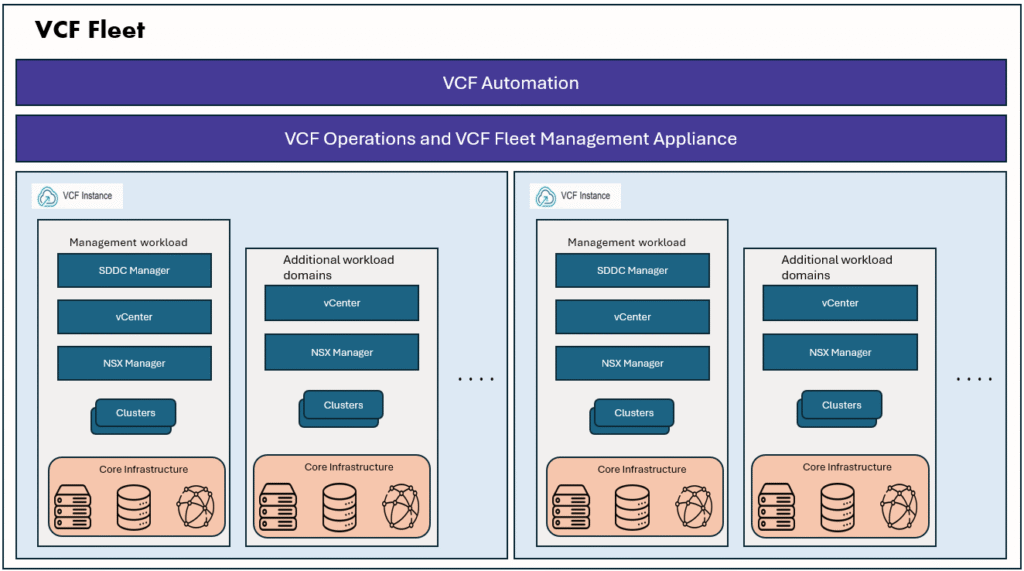
When VCF 9.1 Fleet is deployed in a fully firewalled, network isolated zone, customers often need a detailed communication matrix before running day-2 operations. They will need to know the exact source and destination IPs, ports, and protocols for specific workflows/tasks.
For example:
VCF SSO Setup: Which source component IPs will communicate with the external IdP server, and on which ports?
Offline Depot Configuration: Which source component IPs and ports must be allowed to communicate with the offline depot?
While the official VMware Ports and Protocols site covers traffic requirements between internal VCF 9.1 components, it doesn’t detail external integrations. We still need to document required ports and protocols for external dependencies like Identity Providers (Ping, Entra ID), Active Directory, Microsoft CA, offline depots, and SFTP backup targets.
On a recent project, we had to put together a firewall request matrix detailing the source IPs, ports, and protocols for these external connections. Providing this information allowed the customer’s network team to implement the required firewall rules so we could move forward with day-2 tasks.
Here is the list we used. Please note that this may not cover every single external connection or Day-2 scenario, but these settings worked successfully in our environment.
Please note that this may not cover every single external connection or Day-2 scenario, but these settings worked successfully in our environment.
| Task/Configuration | Product | Releases | Port | Protocol | Source | Destination |
|---|---|---|---|---|---|---|
| Offline depot | VCF | 9.1.0 | 443 | TCP | VCF Management service IP range | Offline Depot |
| Offline depot | VCF | 9.1.0 | 80 | TCP | VCF Management service IP range | Offline Depot |
| Offline depot | VCF | 9.1.0 | 443 | TCP | SDDC Manager IP/FQDN | Offline Depot |
| Offline depot | VCF | 9.1.0 | 80 | TCP | SDDC Manager IP/FQDN | Offline Depot |
| Offline depot | VCF | 9.1.0 | 443 | TCP | Fleet components IP address/FQDN* | Offline Depot |
| Offline depot | VCF | 9.1.0 | 80 | TCP | Fleet components IP address/FQDN | Offline Depot |
| SFTP Server | VCF | 9.1.0 | 22 | TCP | SDDC Manager IP/FQDN | SFTP Server |
| SFTP Server | VCF | 9.1.0 | 22 | TCP | NSX Manager IPs including the VIP/FQDNs | SFTP Server |
| SFTP Server | VCF | 9.1.0 | 22 | TCP | vCenter IP/FQDN | SFTP Server |
| SFTP Server | VCF | 9.1.0 | 22 | TCP | VCF Operations VM FQDN/IP | SFTP Server |
| SFTP Server | VCF | 9.1.0 | 22 | TCP | VCF Automation VM FQDN/IP | SFTP Server |
| SFTP Server | VCF | 9.1.0 | 22 | TCP | VCF Management Services IP Range | SFTP Server |
| SFTP Server | VCF | 9.1.0 | 22 | TCP | VCF Identity Broker FQDN/IP** | SFTP Server |
| Ping ID Server/VCF SSO setup | VCF | 9.1.0 | 443 | HTTPS/TCP | VCF Identity Broker FQDN/IP | Ping IDP |
| Ping ID Server/VCF SSO setup | VCF | 9.1.0 | 443 | HTTPS/TCP | VCF Management Services IP Range | Ping IDP |
| Ping ID Server/VCF SSO setup | VCF | 9.1.0 | 636 | LDAPS | VCF Identity Broker FQDN/IP | AD Domain controllers |
| Ping ID Server/VCF SSO setup | VCF | 9.1.0 | 636 | LDAPS | VCF Management Services IP Range | AD Domain controllers |
| Ping ID Server/VCF SSO setup | VCF | 9.1.0 | 389 | LDAP | VCF Identity Broker FQDN/IP | AD Domain controllers |
| Ping ID Server/VCF SSO setup | VCF | 9.1.0 | 389 | LDAP | VCF Management Services IP Range | AD Domain controllers |
| Ping ID Server/VCF SSO setup | VCF | 9.1.0 | 3269 | LDAPS | VCF Identity Broker FQDN/IP | AD Domain controllers |
| Ping ID Server/VCF SSO setup | VCF | 9.1.0 | 3269 | LDAPS | VCF Management Services IP Range | AD Domain controllers |
| Ping ID Server/VCF SSO setup | VCF | 9.1.0 | 53 | DNS | VCF Identity Broker FQDN/IP | DNS servers |
| Ping ID Server/VCF SSO setup | VCF | 9.1.0 | 53 | DNS | VCF Management Services IP Range | DNS servers |
| Microsoft CA Server | VCF | 9.1.0 | 443 | HTTPS/TCP | VCF Operations nodes IP/FQDN | Microsoft CA Web Enrollment Server (IIS) |
| Microsoft CA Server | VCF | 9.1.0 | 443 | HTTPS/TCP | VCF Management Services IP Range | Microsoft CA Web Enrollment Server (IIS) |
| Microsoft CA Server | VCF | 9.1.0 | 443 / 80 / 389 | TCP/UDP | VCF Operations nodes IP/FQDN | CRL Distribution Point (CDP) (Could be AD, web, or file server) |
| Microsoft CA Server | VCF | 9.1.0 | 443 / 80 / 389 | TCP/UDP | VCF Management Services IP Range | CRL Distribution Point (CDP) (Could be AD, web, or file server) |
| Microsoft CA Server | VCF | 9.1.0 | 53 | DNS | VCF Operations nodes IP/FQDN | DNS servers |
| Microsoft CA Server | VCF | 9.1.0 | 53 | DNS | VCF Management Services IP Range | DNS servers |
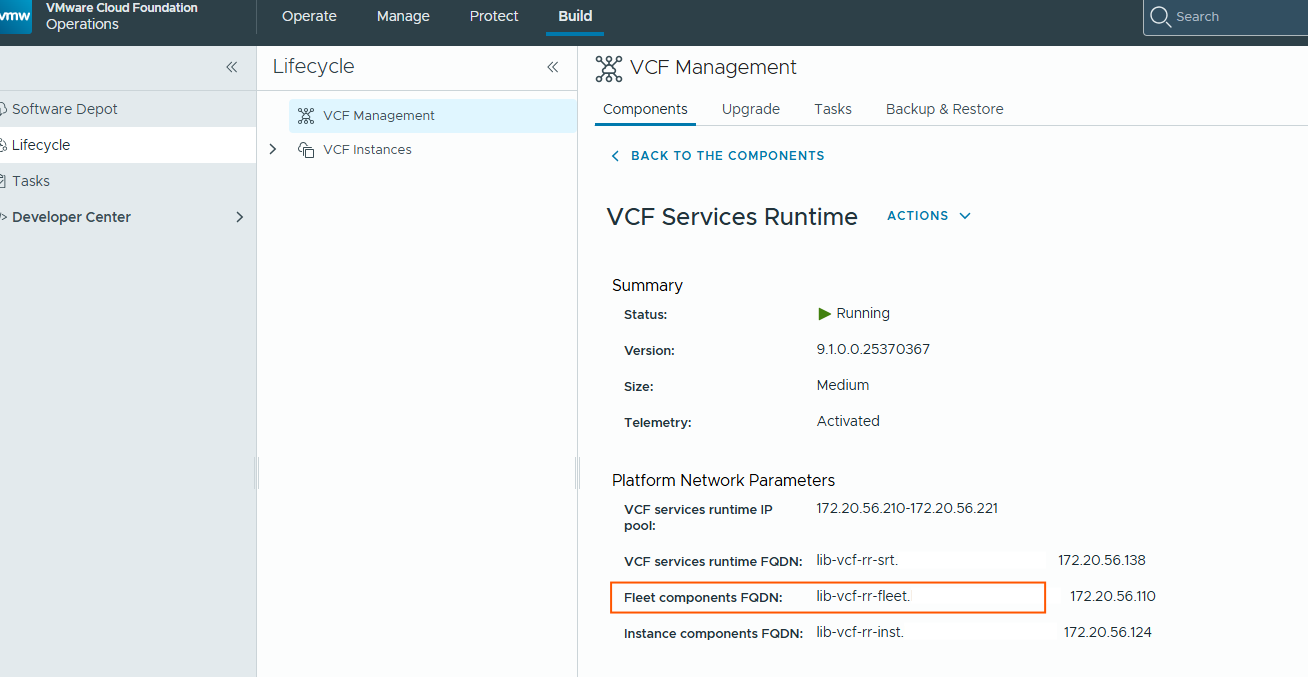
*How do you find the fleet components FQDN, please refer the below screenshot.
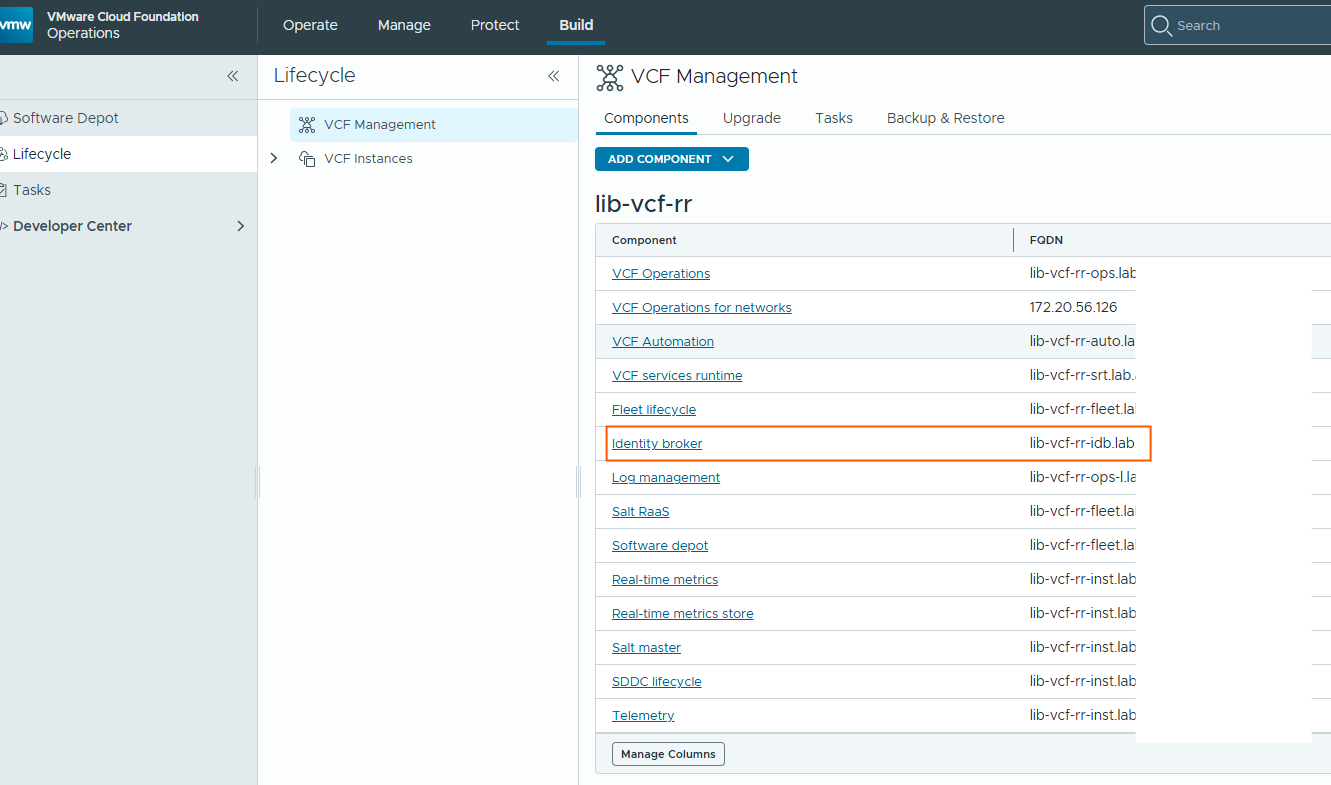
**How do you find the VIDB FQDN?
I hope you find something helpful in this blog, Thank you for reading.