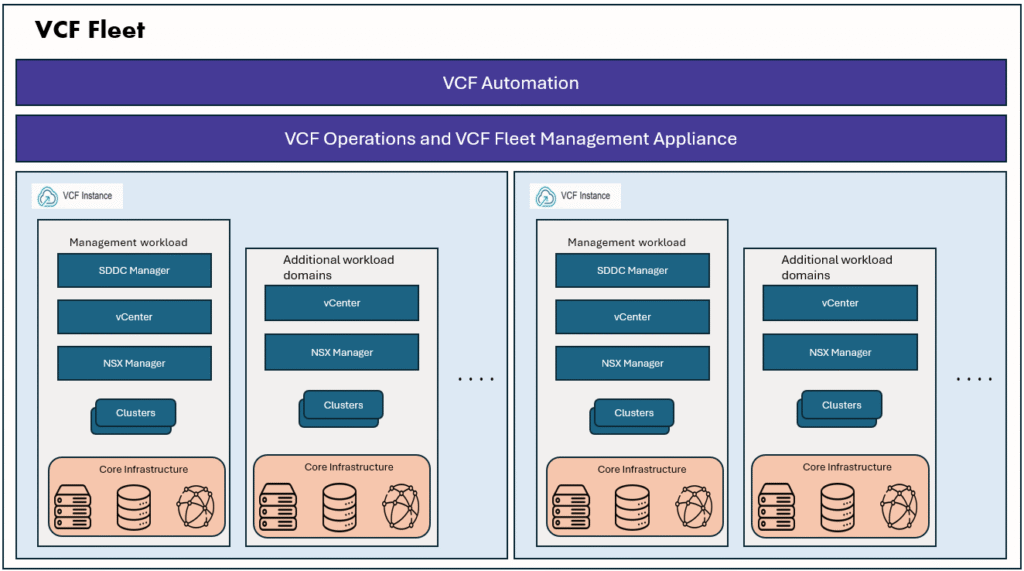
With the release of vSphere 9 and VCF 9, VMware Broadcom has reimagined how modern applications and infrastructure are consumed on vSphere. In earlier versions of vSphere 8, enabling workload management transformed a cluster into a Supervisor Cluster, primarily focused on running Kubernetes workloads. While this was a big step forward, VMs and container-based applications were still managed separately.
In vSphere 9 and VCF9, the Supervisor has evolved into a unified control plane, bringing together VMs, vSphere Pods, and upstream Kubernetes clusters (VKS) under a single, declarative API. This not only simplifies operations for vSphere administrators but also empowers DevOps engineers and end users with true self-service consumption, creating a seamless cloud-like experience directly within vSphere.
vSphere supervisor management can be enabled while creating a new workload domain, or we can do it later in vSphere 9/VCF9 it is called as supervisor management instead of workload management.
Why do we need it? (Challenges with traditional stack)
- Traditional environments have 3 disconnected layers:
- Developers → Manage only pods/applications.
- K8s cluster admins → Manage Kubernetes infra.
- vSphere admins → Manage VMs/infra.
How Supervisor helps
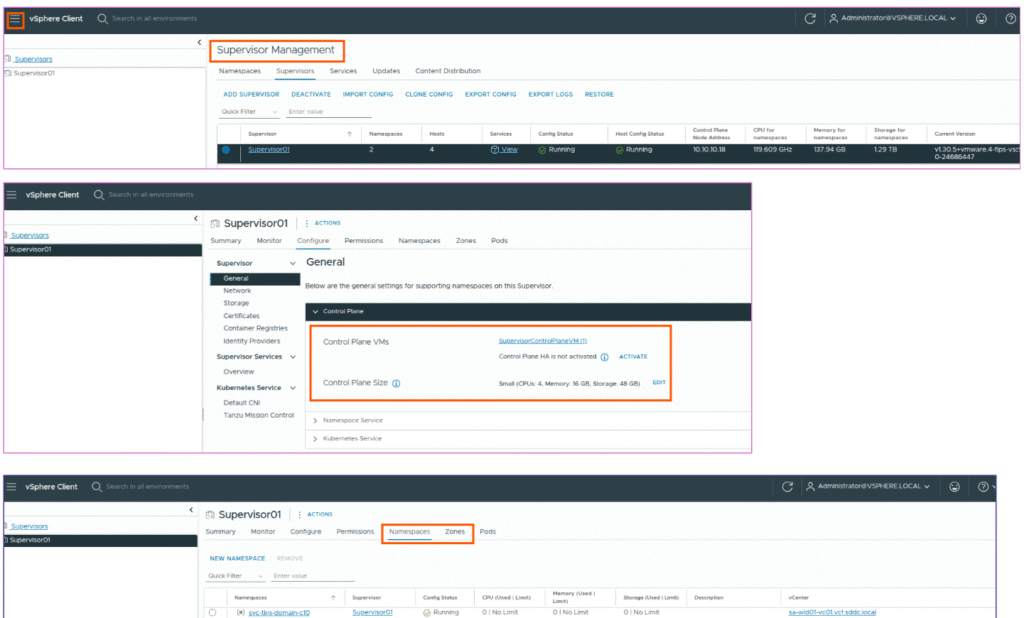
When you enable vSphere supervisor on a workload domain vCenter, it creates a control plane VM which hosts the Kubernetes layer. You can create supervisor on a cluster with HA mode (3 control plane VMs) or simple deployment mode (single control plane VM).
By default supervisor will be created with the first cluster as it’s default zone, it is considered as management zone, you can create additional zones if you have more than one cluster in your workload domain. vSphere zones provides high availability for control plane VMs across clusters.
Supervisor control plane provides these benifits:
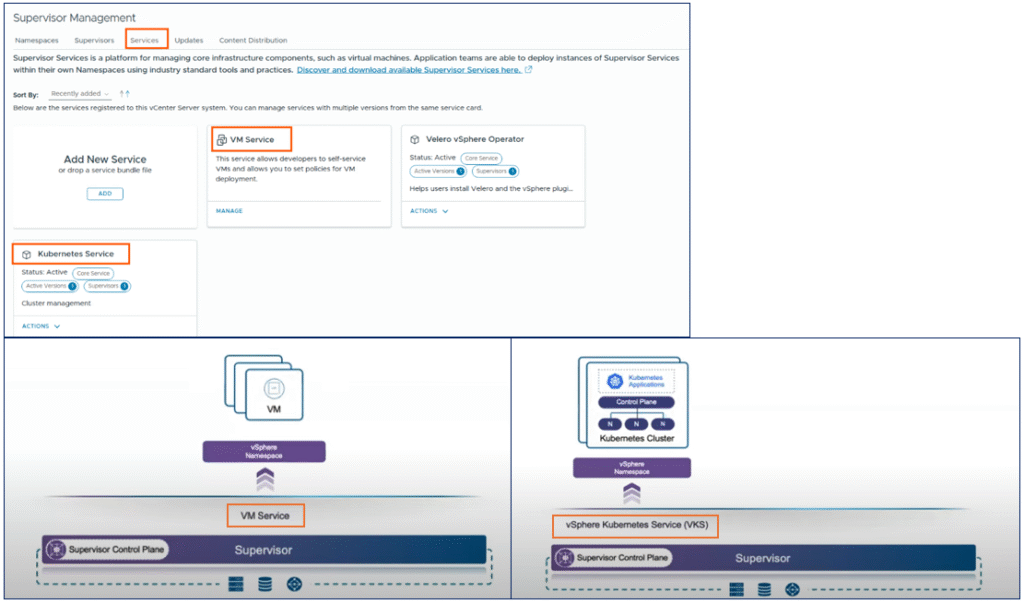
vSphere Admins can
- Create vSphere Namespaces → logical containers of CPU, memory, and storage quotas.
- Monitor and manage Pods, VMs, and Kubernetes clusters (VKS) directly in the vSphere Client.
- Get full visibility of workloads → where they’re running, how they’re consuming resources.
DevOps Engineers can
- Run Kubernetes workloads inside the allocated Namespaces.
- Deploy multiple upstream Kubernetes clusters using vSphere Kubernetes Service (VKS).
- Deploy containers directly as vSphere Pods (special lightweight VMs).
- Deploy and manage regular VMs as well.
Supervisor Components and general architecture
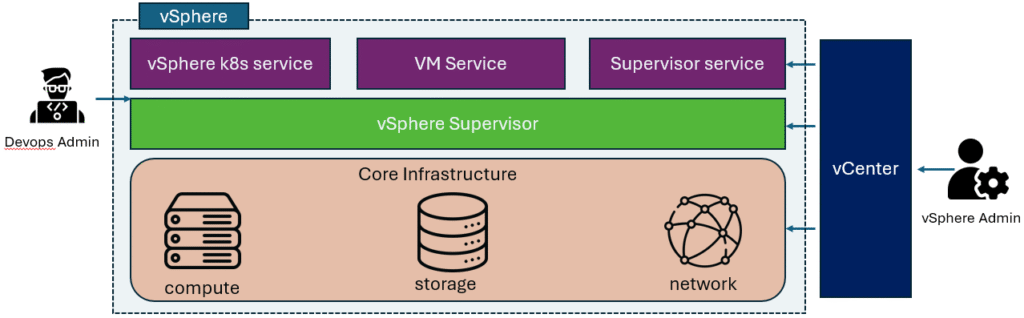
Supervisor Control Plane VMs
- Deployed as either one or three VMs (three recommended for high availability).
- Each VM has its own IP, with:
- 1 floating IP for cluster access.
- 1 additional IP reserved for patching.
- Load balanced across the control plane nodes.
- Placement and migration handled by vSphere DRS for availability.
- Spread across single zone or multiple zones.
VKS and Cluster API
- Runs on the Supervisor.
- Provisioning and lifecycle management of vSphere Kubernetes Service (VKS) clusters.
VM Service
- Manages the deployment of stand-alone VMs as well as the VMs that form part of VKS clusters.
- Enables VMs to be consumed declaratively via Kubernetes, alongside Pods and clusters.
Spherelet
- A process running natively on each ESXi host.
- Acts like a kubelet, enabling ESXi hosts themselves to join the Kubernetes cluster.
Container Runtime Executive (CRX)
- A lightweight runtime environment for vSphere Pods.
- Functions like a VM from vCenter’s perspective, with a paravirtualized Linux kernel.
- Uses direct boot to bypass traditional kernel initialization, allowing Pods to start almost as fast as containers.
- Provides strong VM-level isolation while delivering container-like performance.
Supervisor Services
With supervisor services feature you can also deploy VMware certified Kubernetes operators as services in the vSphere supervisor control plane. These optional services deliver Infrastructure-as-a-Service components and tightly-integrated Independent Software Vendor services to developers. You can install and manage Supervisor Services on the vSphere Supervisor environment so that to make them available for use with Kubernetes workloads.
One example of such service is secret store service.
References: What’s New in vSphere Supervisor: Advancing Kubernetes Operations in VCF
For detailed understanding on vSphere supervisor deployment and configuration, please refer Broadcom document vSphere supervisor installation and configuration