In earlier blogs, we explored the VCF architecture, its core components, and the new capabilities introduced in VCF 9.
In this post, we shift focus to the VCF Automation.
This is Part 1 of a 3 part series, In Part 1 we discuss about VCF Automation and its core foundations and components.
- Part 1 – VCF9 Automation for a Cloud-Like Experience
- Part 2 – VCF Automation: Step by step guide to setup Provider Management
- Part 3 – VCF Automation: Step by step guide to setup Organization management
VCF Automation
VCF Automation (a.k.a VMware Aria Automation) enables IT organizations to run a modern self-service private cloud in on-premises datacenters or across supported public clouds. IT service providers and cloud administrators can deliver a true cloud consumption experience to developers, DevOps teams, and platform engineering groups through a unified IaaS interface.
By combining capabilities of Aria Automation and VMware Cloud Director (vCD), VCF 9 delivers an integrated private cloud experience. This integration streamlines management for cloud administrators and provides a true self-service model for end users.
The automation framework is built on three core foundations: Tenant Management, Cloud Governance, and End-User Experience.
1.Tenant Management
It is most important feature in VCD, VCF 9 Automation inherits and extends tenant management capabilities from VMware Cloud Director (VCD):
- Multi-Tenancy – Cloud Admins and providers can logically segment VCF infrastructure into multiple tenants, whether they are internal lines of business (LOBs) or external customers.
- Resource Allocation – Embedded vCD features allow admins to allocate and manage compute, storage, Kubernetes and networking resources across tenants for optimal distribution.
- Identity and Access Management (IAM) – With federated identity integration, roles, and group-based access, tenant/LOB admins can enforce secure access and align permissions with organizational policies.
- Tenant Operations – Out-of-the-box (OOTB) operational capabilities such as capacity monitoring, cost management, and chargeback enable transparent allocation of costs to different tenants or LOBs.
2. Cloud Governance
Governance policies ensure control, compliance, and efficient resource utilization across projects and application teams. Within each tenant, administrators can define projects and enforce governance policies at the project level.
- Quotas – Enforce consumption limits for compute, storage, and networking.
- Leases – Apply time-bound resource allocations.
- Naming Policies – Maintain naming conventions for consistency
- Showback & Reporting – Provide visibility into resource utilization without direct chargeback.
Additionally, Application Blueprints allow administrators to standardize deployments for a variety of workloads such as VM based applications, containerized workloads, and AI/ML apps etc.
VCF Automation also supports event-based extensibility to orchestrate workflows, enabling IT and business process automation triggered by defined events.
3. End User Experience
End users interact with a self-service IaaS interface that simplifies workload consumption:
- IaaS Services – Out-of-the-box provisioning of VMs, Kubernetes clusters, storage, networking, and related resources.
- Data Services – Integrated services for application development.
- Backup & DR Services – Built-in options to ensure resilience, continuity, and data protection.
- Application Catalogs – Pre-curated catalogs containing VM images, blueprints, and workflows accelerate deployment and ensure standardization.
Personas in VCF Automation
End Users / DevOps / Platform Engineering Teams
- Consume services through the self-service catalog.
- Provision and manage IaaS services such as VMs, Kubernetes clusters/container workloads.
- Perform Day-2 operations (e.g., scaling, reconfiguring, restarting, or retiring workloads).
- Gain visibility into the health, performance, and lifecycle of their deployed workloads.
LOB / Tenant Administrators (Organization Admins)
- Define and manage projects, vSphere namespaces, and virtual private clouds (VPCs).
- Enforce governance policies such as quotas, leases, and naming standards.
Enterprise Administrators / Service Provider Administrators
- Organize and allocate infrastructure resources across multiple tenants or LOBs.
- Configure and manage networking, resource pools, and global policies.
- Manage and Monitor tenant utilization, and chargeback
VCF Automation building Blocks
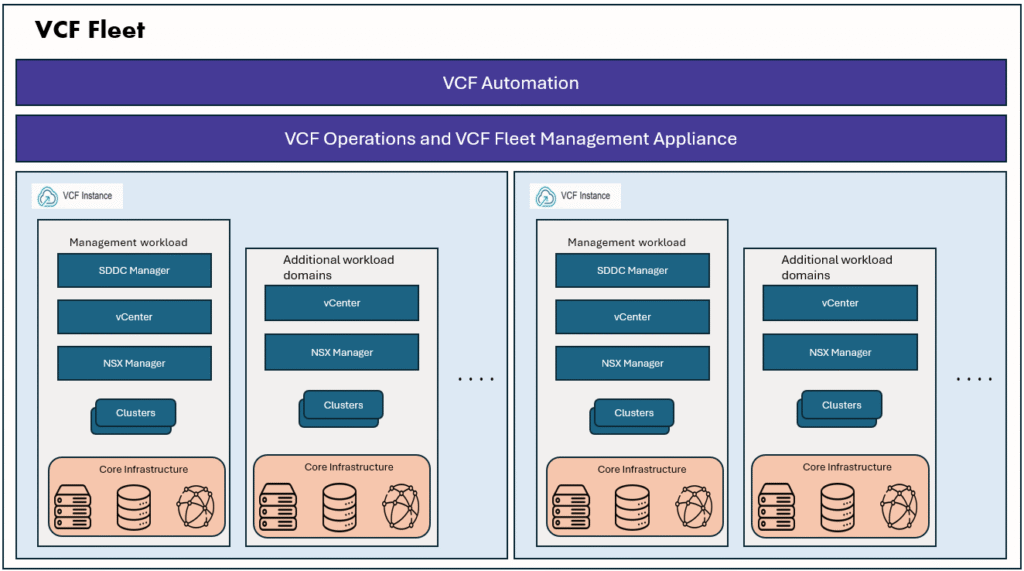
With the VCF installer, we first deploy the VCF Fleet starting with the Management Domain, followed by one or more Workload Domains that can include multiple clusters. At this stage, the physical infrastructure is fully deployed and ready to consume.
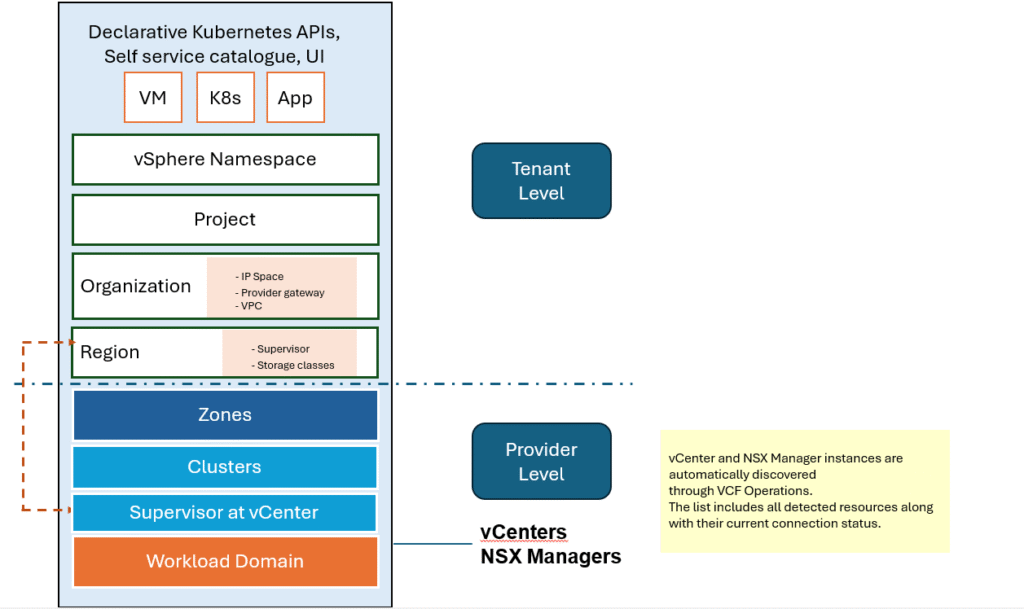
The next step is to understand the building blocks of VCF Automation—the key components that makes the self-service, cloud-like experience possible to end users. To make this easier, let’s break down the core building blocks of VCF Automation.
- Supervisor: The core component that manages physical infrastructure resources and runs workloads. In general there will be one Supervisor for one vCenter. A supervisor is a capability that turns vSphere into a platform that can host multiple IaaS services. Supervisor defines the scope of vSphere IaaS control plane on vCenter. A supervisor is a collection of one or more clusters on a vCenter instance and can span across multiple zones for fault tolerance.
I published a detailed blog post on vSphere supervisor, its architecture and its functionality.
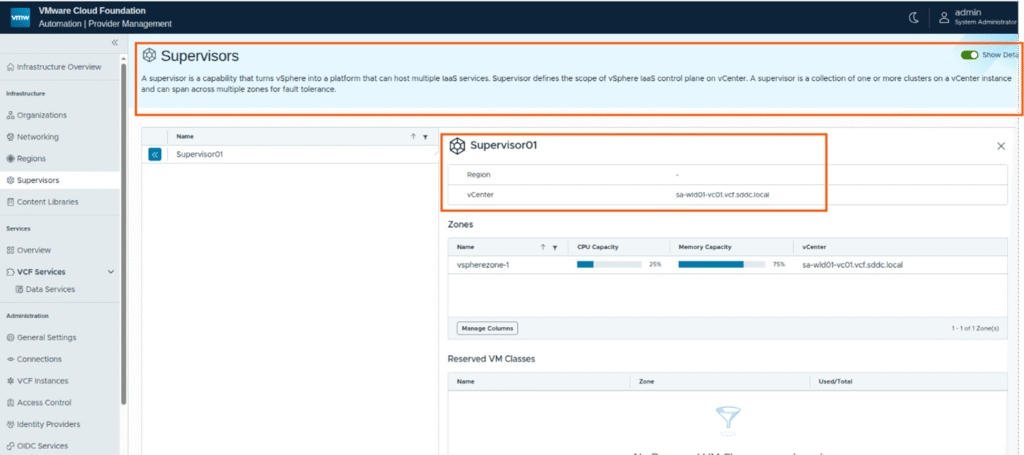
- Zones: vSphere clusters that provide compute resources for a Supervisor. A Supervisor can span multiple Zones.
- vSphere Namespace:
- A resource pool under a Supervisor that runs workloads for a Project.
- Provides isolation for networking by using VPCs and for data separation using Storage policies
- Controls access to content libraries and VM/container images.
- Multiple Namespaces can be linked to a Project for flexible resource allocation.
Supervisors and zones are defined in vCenter level.
- Region: A group of one or more Supervisors. A region is collection of compute, storage, networking that span across multiple vCenters and share the same NSX Local manager.
- Organization: The top-level entity in VCF Automation that groups and manages resources, users, policies, IaaS services, and catalogs. It provides centralized billing, access control, and governance across teams and departments. It maintains secure boundary from other organizations.
- Project:
- Subdivision within an Organization, created by the Org Admin.
- Distributes resource quotas (via vSphere Namespaces) to application teams.
- Manages users, groups, roles, IaaS services, and catalog items.
- Blueprints are tied to projects, with policies for deployment control, limits, and resource reclamation.
- By default, every Organization has:
- 1 default Project
- 3 vSphere Namespace classes (small, medium, large)
- At least 1 vSphere Namespace is required before provisioning resources.
- Multiple Projects can be created for different business needs.
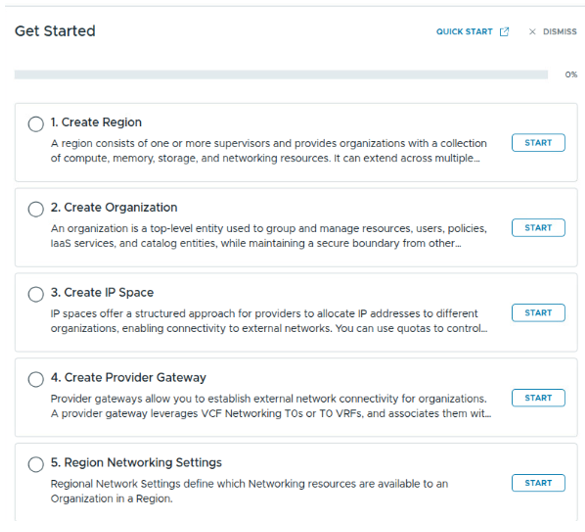
High level overview of VCF Automation customer journey map – Provider-consumption setup you can find it here:
Summary
VMware Cloud Foundation (VCF) provides a unified platform that simplifies the deployment and management of private clouds. Starting with the Management Domain and extending to Workload Domains, VCF delivers a consistent, secure, and scalable infrastructure foundation.
With VCF Automation, organizations can transform this infrastructure into a modern self-service private cloud. By leveraging Supervisors, Zones, Regions, Organizations, Projects, and vSphere Namespaces, IT teams can offer developers and application owners a true cloud consumption experience—combining speed, governance, and flexibility.
In future blogs, I’ll discuss more into VCF Automation in action—covering detailed workflows, how IT teams can leverage it to deliver a true cloud-like experience for both VM and container workloads.
Thank you for reading !