A clear understanding of the VCF architecture and its components is essential for successfully deploying, configuring, and managing a Cloud Foundation environment.
In this blog, I will cover:
- VCF architecture and its core components
- Infrastructure appliances in VCF
- Simple vs. High Availability (HA) deployment models
- Deployment pathways overview
VCF Architecture and components
VMware Cloud Foundation (VCF) is built on a flexible and modular architecture that supports a wide ecosystem of vendor infrastructure and partner integrations. For deeper design considerations, we can refer the VCF Design Guide.
At a high level, the following constructs form the backbone of Cloud Foundation:
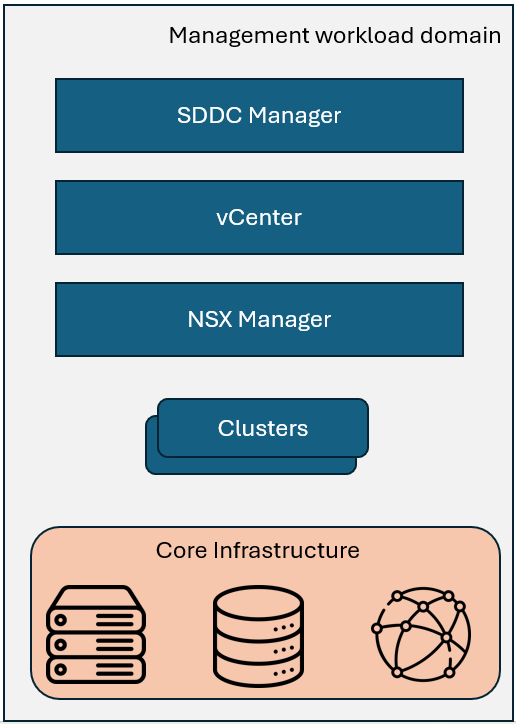
- Management Workload Domain (Mgmt WLD) – Contains all the infrastructure virtual machines and services required to deploy, operate, and monitor VCF. The first cluster in the management domain hosts all infrastructure management appliances like vCenter Server, SDDC Manager, NSX Managers, and NSX Edge nodes (for MGMT domain).
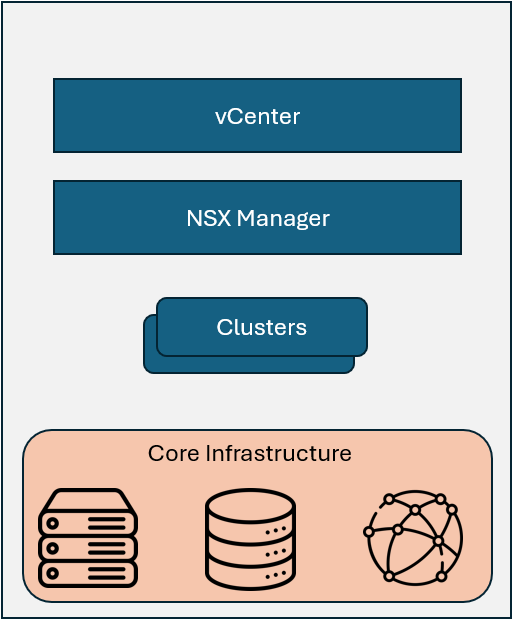
- Workload Domain (WLD) – Purpose-built domains for running customer workloads such as VMs and containers. These are isolated from the management domain and can be scaled independently.
- VCF Instance – The core building block of VCF. Each instance includes a Management Domain and, optionally, one or more Workload Domains.
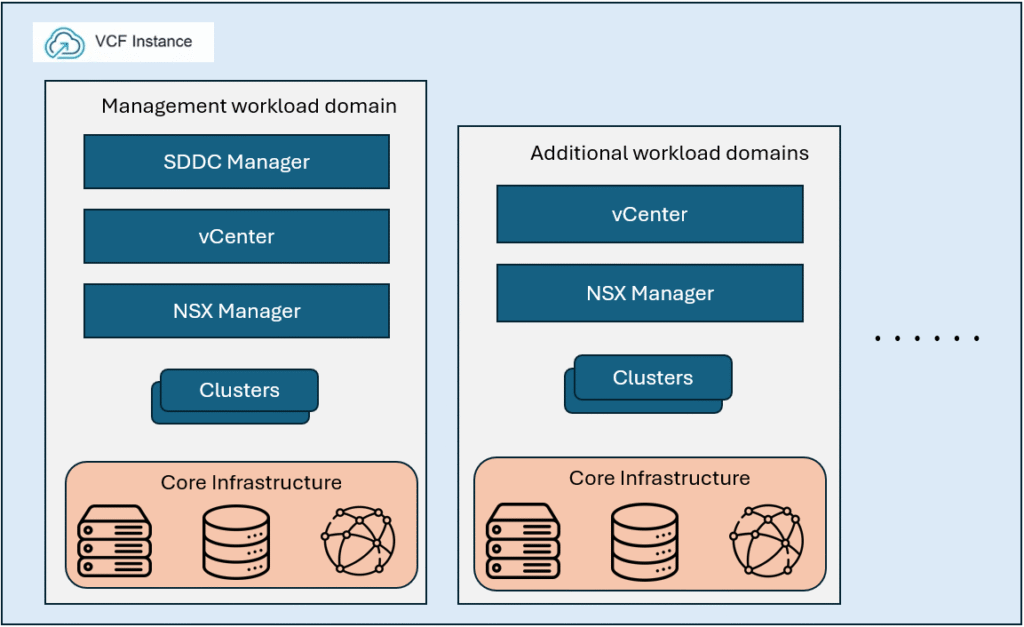
- VCF Fleet – A collection of VCF instances managed centrally by fleet-level components such as VCF Operations, Fleet Management appliances, and VCF Automation.
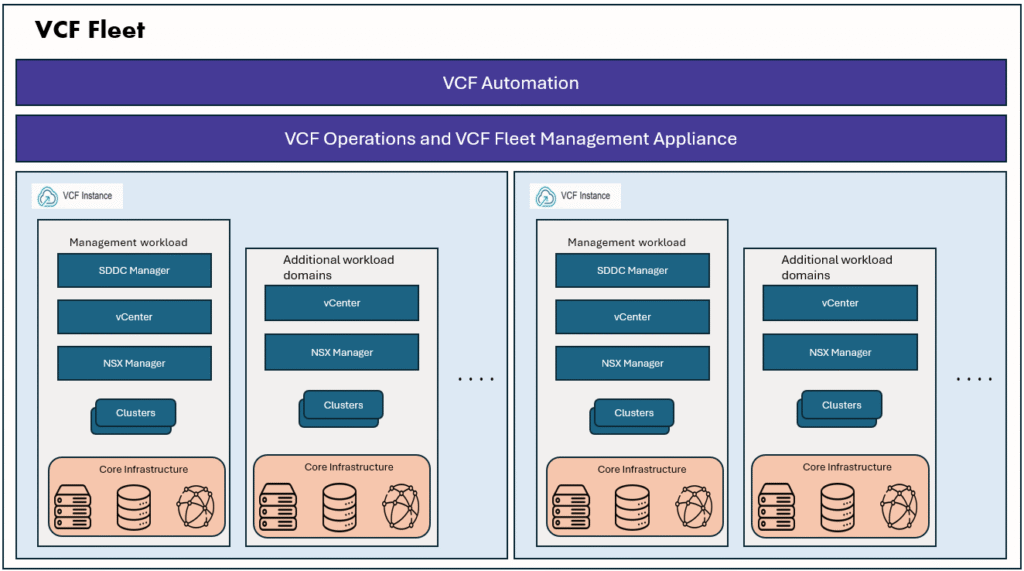
- VCF Private Cloud – Represents the full VCF deployment, managed as a unified cloud platform. VCF Private cloud consists of one ore more VCF Fleets belong to a single customer. When you deploy VCF for the first time, you effectively create a VCF Private Cloud managed by a single automated platform.
The architecture enables consistent lifecycle management, workload isolation, and simplified operations across hybrid and multi-cloud environments.
VCF Infrastructure appliances
- VCF Operations
It plays a central role in ensuring that private cloud environments are deployed efficiently, operated consistently, and secured effectively. It acts as the control layer for managing the fleet of VCF instances, giving organizations a single operational view across both infrastructure and workloads. It takes care Fleet management, security management, day2 operations management. - VCF Operations Collector
The VCF Operations Collector is a management appliance in VMware Cloud Foundation that gathers data from the private cloud. It helps monitor infrastructure health, track resource usage, and ensure compliance across multiple VCF instances. - VCF Operations for Logs (Optional)
Extends VCF Operations with log ingestion, indexing, and correlation. Enables intelligent troubleshooting and root-cause analysis across vSphere, NSX, and vSAN components. - VCF Operations for Networks (Optional)
Adds network-level analytics and observability. Provides flow visibility, topology mapping, and anomaly detection for NSX-based traffic. - VCF Operations for Networks Collector (Optional)
Collects raw packet, flow, and network metrics locally. Ensures minimal overhead by offloading analysis to VCF Operations. - VCF Operations Fleet Management
Orchestrates deployment, lifecycle, and configuration management for VCF Operations, Automation, and Identity Broker. Simplifies multi-instance management at scale. - VCF Identity Broker (Optional)
Integrates VCF with enterprise identity providers (IdP) like Active Directory or SAML. Provides centralized authentication and single sign-on (SSO) across all VCF components. - VCF Automation
Provides policy-based automation for workload provisioning and governance. Streamlines resource allocation with templates, blueprints, and automation workflows. - SDDC Manager
The core lifecycle management engine of VCF. Automates ESXi, vCenter, and NSX upgrades, workload domain deployments, and vSAN stretched cluster configurations. - NSX Manager
Centralized management plane for VMware NSX. Manages logical networking, micro-segmentation, routing, and distributed firewall policies. - NSX Edge (optional)
Provides north-south data center connectivity, NAT, load balancing, and VPN services. Acts as a gateway between the virtualized network fabric and the physical data center. - vCenter
The centralized control plane for vSphere environments. Manages ESXi hosts, clusters, resource pools, and provides APIs for automation and integration.
Simple vs HA deployment models
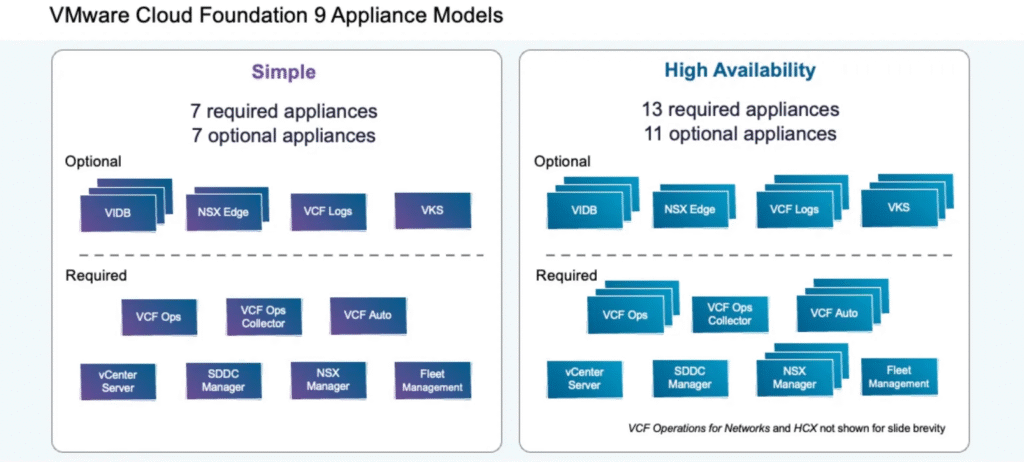
VCF 9.0 supports two primary appliance deployment models — Simple Model and High Availability (HA) Model. Each model defines how core VCF components are deployed and scaled.
Simple Model
The Simple Model is best suited for lab, test, or smaller-scale environments. A minimum of 7 appliances are deployed:
- Core Infrastructure: One appliance each for vCenter Server, SDDC Manager, and NSX Manager.
- VCF Operations: Single appliances for VCF Operations Manager, Fleet Management, and VCF Operations Collector.
- VCF Automation: One appliance for VCF Automation.
This model offers flexibility, as more VCF Operations services (e.g., Networks, HCX, or add-on services) can be deployed later as post-installation tasks.
High Availability (HA) Model
The HA Model is recommended for production environments where resiliency and continuity are critical. A minimum of 13 appliances are deployed, ensuring redundancy and availability:
- NSX Manager: 3 nodes
- VCF Operations: 3 nodes
- VCF Automation: 3 nodes
- VCF Operations for Logs: 3 nodes
- VKS (if Supervisor is enabled): 3 nodes
This design protects against hardware or node failures, reduces downtime risk, and simplifies lifecycle management — including patching and upgrades.
Additionally, HA deployments can leverage NSX Load Balancer appliances for selected services to improve availability and traffic distribution.
Deployment Pathways overview
Before deploying VMware Cloud Foundation (VCF) 9.0, the first step is to choose your starting point and deployment pathway. VCF 9.0 makes this easier with guided, UI-driven workflows through the VCF Installer and Operations.
Deployment options include:
- New VCF Instance – Fresh deployment of VCF 9.0.
- Converge existing vSphere– Move an existing vSphere setup into a VCF management domain.
- Upgrade VCF 5.x – In-place upgrade to VCF 9.0.
- Import vSphere 9.0 – Import an existing vSphere 9.0 environment under VCF as a Workload domain.
I’ve already published a detailed article on the “Converge Existing vSphere” deployment pathway — read it here. For the remaining options, I’ll be sharing separate articles shortly. Stay tuned!