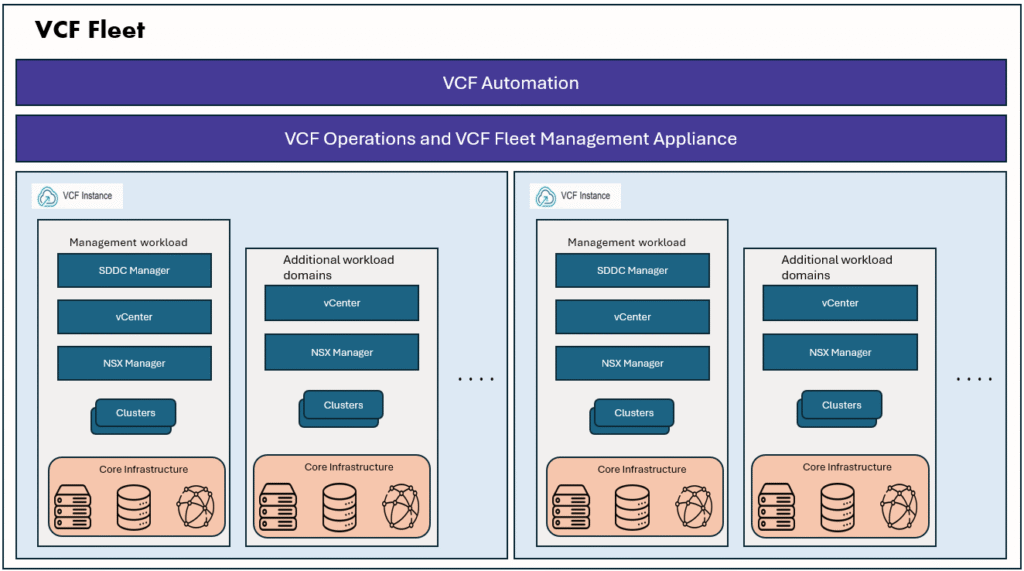
In this blog, we will explore how we can deploy a VCF Fleet using terraform VCF provider.
Terraform is widely popular Infrastructure as Code tool, which is used to deploy various infrastructure resources. You can define the desired state of your infrastructure by terraform code and terraform will take the required actions to deploy/modify/destroy the resources as per the requirement.
Terraform supports thousands of providers, and popular with public cloud vendors like Azure, AWS, GCP. Broadcom also developed a terraform provider for VCF9 and it supports deploying VCF Fleet, VCF domain, VCF cluster and other VCF resources.
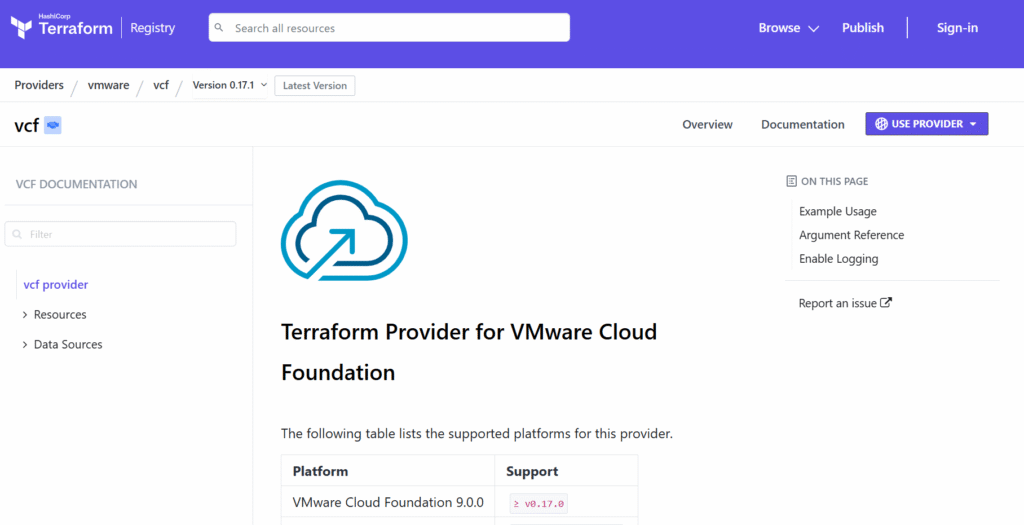
To start deploying VCF instance using Terraform, you install Terraform on your machine. Follow the installation documentation here.
Required configuration Files:
To start the VCF Fleet deployment with Terraform vcf provider, we have to prepare these 4 configuration files.
- variables.tf –> Define all the variable names, type of the variable here
- terraform.tfvars –> Define the values for the variables
- provider.tf –> Defined the provider specification, connection configuration
- main.tf –> Define the infrastructure resource and its required schema
I have prepared these configuration files already.
variable.tf
variable "installer_host" {
  type = string
}
variable "installer_username" {
  type = string
}
variable "installer_password" {
  type = string
}
variable "allow_unverified_tls" {
  type = string
}
variable "instance_id" {
  type = string
}
variable "esx_thumbprint_validation" {
  type = string
}
variable "mgmt_network_pool" {
  type = string
}
variable "ceip_flag" {
  type = string
}
variable "vcf_version" {
  type = string
}
variable "sddc_manager_hostname" {
  type = string
}
variable "vcf_root_password" {
  type = string
}
variable "vcf_ssh_password" {
  type = string
}
variable "vcf_local_user_password" {
  type = string
}
variable "ntp_server" {
  type = list(string)
}
variable "dns_domain_name" {
  type = string
}
variable "primary_dns_server" {
  type = string
}
variable "management_network_subnet" {
  type = string
}
variable "management_network_vlan" {
  type = string
}
variable "management_network_mtu" {
  type = string
}
variable "management_network_type" {
  type = string
}
variable "management_network_gateway" {
  type = string
}
variable "management_network_uplinks" {
  type = list(string)
}
variable "vmotion_network_subnet" {
  type = string
}
variable "vmotion_network_vlan" {
  type = string
}
variable "vmotion_network_mtu" {
  type = string
}
variable "vmotion_network_type" {
  type = string
}
variable "vmotion_network_gateway" {
  type = string
}
variable "vmotion_network_uplinks" {
  type = list(string)
}
variable "vmotion_ip_address_range_ip_start" {
  type = string
}
variable "vmotion_ip_address_range_ip_end" {
  type = string
}
variable "vsan_network_subnet" {
  type = string
}
variable "vsan_network_vlan" {
  type = string
}
variable "vsan_network_mtu" {
  type = string
}
variable "vsan_network_type" {
  type = string
}
variable "vsan_network_gateway" {
  type = string
}
variable "vsan_network_uplinks" {
  type = list(string)
}
variable "vsan_ip_address_range_ip_start" {
  type = string
}
variable "vsan_ip_address_range_ip_end" {
  type = string
}
variable "nsx_manager_size" {
  type = string
}
variable "nsx_manager_hostname" {
  type = string
}
variable "nsx_manager_root_password" {
  type = string
}
variable "nsx_manager_admin_password" {
  type = string
}
variable "nsx_manager_audit_password" {
  type = string
}
variable "vsan_datastore_name" {
  type = string
}
variable "vsan_esa_flag" {
  type = string
}
variable "vsan_dedup_flag" {
  type = string
}
variable "vsan_ftt" {
  type = string
}
variable "management_dvs_name" {
  type = string
}
variable "management_dvs_mtu" {
  type = string
}
variable "dvs_first_vmnic_name" {
  type = string
}
variable "dvs_first_uplink_name" {
  type = string
}
variable "management_datacenter" {
  type = string
}
variable "management_cluster" {
  type = string
}
variable "vcenter_hostname" {
  type = string
}
variable "vcenter_root_password" {
  type = string
}
variable "vcenter_vm_size" {
  type = string
}

variable "operations_hostname" {
  type = string
}
variable "operations_node_type" {
  type = string
}
variable "operations_root_user_password" {
  type = string
}
variable "operations_collector_hostname" {
  type = string
}
variable "operations_collector_node_size" {
  type = string
}
variable "operations_fleet_management_hostname" {
  type = string
}
variable "operations_fleet_management_root_user_password" {
  type = string
}
variable "operations_fleet_management_admin_user_password" {
  type = string
}
variable "operations_admin_password" {
  type = string
}
variable "operations_appliance_size" {
  type = string
}
variable "management_domain_esxi_host_1" {
  type = string
}
variable "management_domain_esxi_host_2" {
  type = string
}

variable "management_domain_esxi_host_1_ssl_thumbprint" {
  type = string
}
variable "management_domain_esxi_host_2_ssl_thumbprint" {
  type = string
}

variable "esxi_host_user_name" {
  type = string
}
variable "esxi_host_password" {
  type = string
}
variable "teaming_policy" {
  type = string
}
variable "nsx_manager_vip_fqdn" {
  type = string
}
variable "nsx_transport_vlan" {
  type = string
}
variable "nsx_teaming_policy" {
  type = string
}
variable "nsx_active_uplinks" {
  type = list(string)
}
variable "host_switch_operational_mode" {
  type = string
}
variable "vlan_transport_zone_type" {
  type = string
}
variable "overlay_transport_zone_type" {
  type = string
}
variable "vlan_transport_zone" {
  type = string
}
variable "overlay_transport_zone" {
  type = string
}
variable "nsx_ip_pool_name" {
  description = "Name of the NSX IP address pool"
  type        = string
}

variable "nsx_ip_pool_subnet_cidr" {
  description = "CIDR block for the NSX IP address pool subnet (e.g. 192.168.10.0/24)"
  type        = string
}

variable "nsx_ip_pool_gateway" {
  description = "Gateway IP address for the NSX IP address pool subnet"
  type        = string
}

variable "nsx_ip_pool_range_start" {
  description = "Starting IP address in the NSX IP address pool range"
  type        = string
}

variable "nsx_ip_pool_range_end" {
  description = "Ending IP address in the NSX IP address pool range"
  type        = string
}
terraform.tfvars
#username and passwords for setup
installer_host                    = "10.0.0.218"
installer_username                = "admin@local"
installer_password                = "VMware123!VMware123!"
allow_unverified_tls              = "true"
instance_id                       = "vcflab"
mgmt_network_pool                 = "vcflab-mgmt-np01"
ceip_flag                         = "false"
esx_thumbprint_validation         = "true"
vcf_version                       = "9.0.0.0"
sddc_manager_hostname             = "sddcmgr-labvcf.lab.vsphere.local"
vcf_root_password                 = "VMware123!VMware123!"
vcf_ssh_password                  = "VMware123!VMware123!"
vcf_local_user_password           = "VMware123!VMware123!"
ntp_server                        = ["10.0.0.250"]
dns_domain_name                   = "lab.vsphere.local"
primary_dns_server                = "10.0.0.200"
management_network_subnet         = "10.0.0.0/22"
management_network_vlan           = "0"
management_network_mtu            = "8940"
management_network_type           = "MANAGEMENT"
management_network_gateway        = "10.0.0.200"
management_network_uplinks        = ["uplink1"]
vmotion_network_subnet            = "10.0.20.0/24"
vmotion_network_vlan              = "0"
vmotion_network_mtu               = "8940"
vmotion_network_type              = "VMOTION"
vmotion_network_gateway           = "10.0.20.253"
vmotion_network_uplinks           = ["uplink1"]
vmotion_ip_address_range_ip_start = "10.0.20.3"
vmotion_ip_address_range_ip_end   = "10.0.20.10"
vsan_network_subnet               = "10.0.30.0/24"
vsan_network_vlan                 = "0"
vsan_network_mtu                  = "8940"
vsan_network_type                 = "VSAN"
vsan_network_gateway              = "10.0.30.253"
vsan_network_uplinks              = ["uplink1"]
vsan_ip_address_range_ip_start    = "10.0.30.3"
vsan_ip_address_range_ip_end      = "10.0.30.10"
teaming_policy                    = "loadbalance_loadbased"
nsx_manager_size                  = "medium"
nsx_manager_hostname              = "nsxmgr-labvcf.lab.vsphere.local"
nsx_manager_root_password         = "VMware123!VMware123!"
nsx_manager_admin_password        = "VMware123!VMware123!"
nsx_manager_audit_password        = "VMware123!VMware123!"
nsx_manager_vip_fqdn              = "nsxvip-labvcf.lab.vsphere.local"
nsx_transport_vlan                = "0"
vsan_datastore_name               = "labvcf-vsan-ds"
vsan_esa_flag                     = "false"
vsan_dedup_flag                   = "false"
vsan_ftt                          = "0"
management_dvs_name               = "labvcf-cl01-vds"
management_dvs_mtu                = "8940"
dvs_first_vmnic_name              = "vmnic0"
dvs_first_uplink_name             = "uplink1"
nsx_teaming_policy                = "LOADBALANCE_SRCID"
nsx_active_uplinks                = ["uplink1"]
host_switch_operational_mode      = "ENS_INTERRUPT"
vlan_transport_zone_type          = "VLAN"
overlay_transport_zone_type       = "OVERLAY"
nsx_ip_pool_name                  = "labvcf-nsx-mgmt-tep-pool"
nsx_ip_pool_subnet_cidr           = "10.0.40.0/24"
nsx_ip_pool_gateway               = "10.0.40.253"
nsx_ip_pool_range_start           = "10.0.40.3"
nsx_ip_pool_range_end             = "10.0.40.10"
vlan_transport_zone               = "labvcf-vlan-transport-zone"
overlay_transport_zone            = "labvcf-overlay-transport-zone"
management_datacenter             = "labvcf-dc"
management_cluster                = "labvcf-cl01"
vcenter_hostname                  = "vcenter-labvcf.lab.vsphere.local"
vcenter_root_password             = "VMware123!VMware123!"
vcenter_vm_size                   = "small"
operations_hostname                             = "vcfopslabvcf.lab.vsphere.local"
operations_node_type                            = "master"
operations_root_user_password                   = "VMware123!VMware123!"
operations_collector_hostname                   = "vcfopscp-labvcf.lab.vsphere.local"
operations_collector_node_size                  = "small"
operations_fleet_management_hostname            = "vcfopsfm-labvcf.lab.vsphere.local"
operations_fleet_management_root_user_password  = "VMware123!VMware123!"
operations_fleet_management_admin_user_password = "VMware123!VMware123!"
operations_admin_password                       = "VMware123!VMware123!"
operations_appliance_size                       = "small"
management_domain_esxi_host_1                   = "esxi-4.lab.vsphere.local"
management_domain_esxi_host_2                   = "esxi-8.lab.vsphere.local"
management_domain_esxi_host_1_ssl_thumbprint    = "8D:E6:79:80:7A:23:DA:B4:2A:9F:C2:85:1C:9A:33:2A:F7:16:F5:FC:E2:71:82:C4:41:BA:34:6E:1B:38:E9:54"
management_domain_esxi_host_2_ssl_thumbprint    = "E7:4D:B4:EF:D3:FE:D9:9D:1A:0D:06:27:A5:37:97:4D:DC:BD:DE:72:F4:36:CC:23:28:F9:F8:88:7B:BF:08:58"
esxi_host_user_name                             = "root"
esxi_host_password                              = "VMware123!"
provider.tf
###  Required Provider for VCF Instance Creation
terraform {
  required_providers {
    vcf = {
      source  = "vmware/vcf"
      version = "0.17.1"
    }
  }
}

provider "vcf" {
  installer_host       = var.installer_host
  installer_username   = var.installer_username
  installer_password   = var.installer_password
  allow_unverified_tls = var.allow_unverified_tls
}
main.tf
resource "vcf_instance" "sddc_mgmt_domain" {
  instance_id                    = var.instance_id
  management_pool_name           = var.mgmt_network_pool
  skip_esx_thumbprint_validation = var.esx_thumbprint_validation
  ceip_enabled                   = var.ceip_flag
  version                        = var.vcf_version
  sddc_manager {
    hostname            = var.sddc_manager_hostname
    root_user_password  = var.vcf_root_password
    ssh_password        = var.vcf_ssh_password
    local_user_password = var.vcf_local_user_password
  }
  ntp_servers = var.ntp_server
  dns {
    domain      = var.dns_domain_name
    name_server = var.primary_dns_server
  }
  network {
    subnet         = var.management_network_subnet
    vlan_id        = var.management_network_vlan
    mtu            = var.management_network_mtu
    network_type   = var.management_network_type
    gateway        = var.management_network_gateway
    active_uplinks = var.management_network_uplinks
    teaming_policy = var.teaming_policy
  }
  network {
    subnet         = var.vmotion_network_subnet
    vlan_id        = var.vmotion_network_vlan
    mtu            = var.vmotion_network_mtu
    network_type   = var.vmotion_network_type
    gateway        = var.vmotion_network_gateway
    active_uplinks = var.vmotion_network_uplinks
    teaming_policy = var.teaming_policy
    include_ip_address_ranges {
      start_ip_address = var.vmotion_ip_address_range_ip_start
      end_ip_address   = var.vmotion_ip_address_range_ip_end
    }
  }
  network {
    subnet         = var.vsan_network_subnet
    vlan_id        = var.vsan_network_vlan
    mtu            = var.vsan_network_mtu
    network_type   = var.vsan_network_type
    gateway        = var.vsan_network_gateway
    active_uplinks = var.vsan_network_uplinks
    teaming_policy = var.teaming_policy
    include_ip_address_ranges {
      start_ip_address = var.vsan_ip_address_range_ip_start
      end_ip_address   = var.vsan_ip_address_range_ip_end
    }
  }
  nsx {
    nsx_manager_size = var.nsx_manager_size
    nsx_manager {
      hostname = var.nsx_manager_hostname
    }
    root_nsx_manager_password = var.nsx_manager_root_password
    nsx_admin_password        = var.nsx_manager_admin_password
    nsx_audit_password        = var.nsx_manager_audit_password
    vip_fqdn                  = var.nsx_manager_vip_fqdn
    transport_vlan_id         = var.nsx_transport_vlan

    ip_address_pool {
      name = var.nsx_ip_pool_name
      subnet {
        cidr = var.nsx_ip_pool_subnet_cidr
        gateway = var.nsx_ip_pool_gateway
        ip_address_pool_range {
          start   = var.nsx_ip_pool_range_start
          end = var.nsx_ip_pool_range_end
        }
      }

    }
  }

  vsan {
    datastore_name       = var.vsan_datastore_name
    esa_enabled          = var.vsan_esa_flag
    vsan_dedup           = var.vsan_dedup_flag
    failures_to_tolerate = var.vsan_ftt
  }
  dvs {
    dvs_name = var.management_dvs_name
    mtu      = var.management_dvs_mtu
    vmnic_mapping {
      vmnic  = var.dvs_first_vmnic_name
      uplink = var.dvs_first_uplink_name
    }
    networks = [
      "MANAGEMENT",
      "VSAN",
      "VMOTION"
    ]
    nsx_teaming {
      policy         = var.nsx_teaming_policy
      active_uplinks = var.nsx_active_uplinks
    }
    nsxt_switch_config {
      host_switch_operational_mode = var.host_switch_operational_mode
      transport_zones {
        name           = var.vlan_transport_zone
        transport_type = var.vlan_transport_zone_type
      }
      transport_zones {
        name           = var.overlay_transport_zone
        transport_type = var.overlay_transport_zone_type
      }
    }
  }
  cluster {
    datacenter_name = var.management_datacenter
    cluster_name    = var.management_cluster
  }
  vcenter {
    vcenter_hostname      = var.vcenter_hostname
    root_vcenter_password = var.vcenter_root_password
    vm_size               = var.vcenter_vm_size
  }

  operations {
    admin_user_password = var.operations_admin_password
    #appliance_size      = var.operations_appliance_size
    node {
      hostname           = var.operations_hostname
      type               = var.operations_node_type
      root_user_password = var.operations_root_user_password
    }
  }
  operations_collector {
    hostname           = var.operations_collector_hostname
    appliance_size     = var.operations_collector_node_size
    root_user_password = var.operations_root_user_password
  }
  operations_fleet_management {
    hostname            = var.operations_fleet_management_hostname
    root_user_password  = var.operations_fleet_management_root_user_password
    admin_user_password = var.operations_fleet_management_admin_user_password
  }
  host {
    hostname = var.management_domain_esxi_host_1
    credentials {
      username = var.esxi_host_user_name
      password = var.esxi_host_password
    }
    ssl_thumbprint = var.management_domain_esxi_host_1_ssl_thumbprint
  }
  host {
    hostname = var.management_domain_esxi_host_2
    credentials {
      username = var.esxi_host_user_name
      password = var.esxi_host_password
    }
    ssl_thumbprint = var.management_domain_esxi_host_2_ssl_thumbprint
  }
}
With all these files ready, now we can start the Terraform deployment.
- terraform init
- terraform plan
- terraform apply -auto-approve
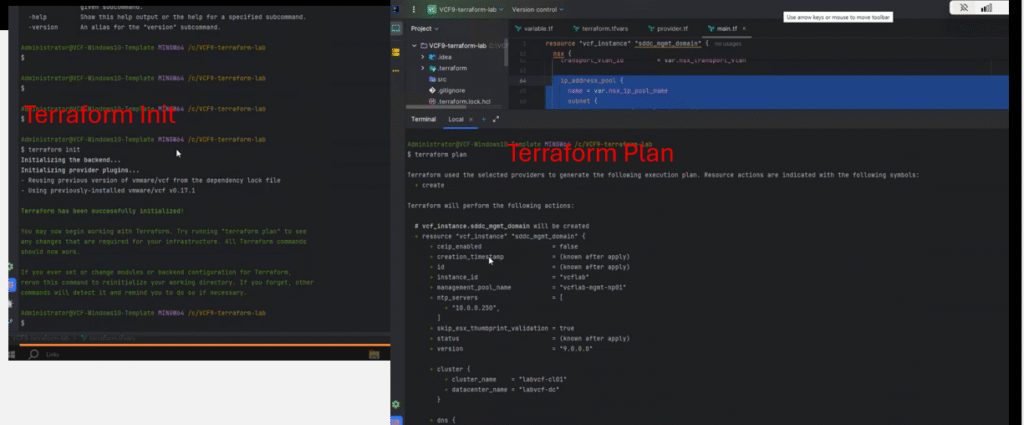
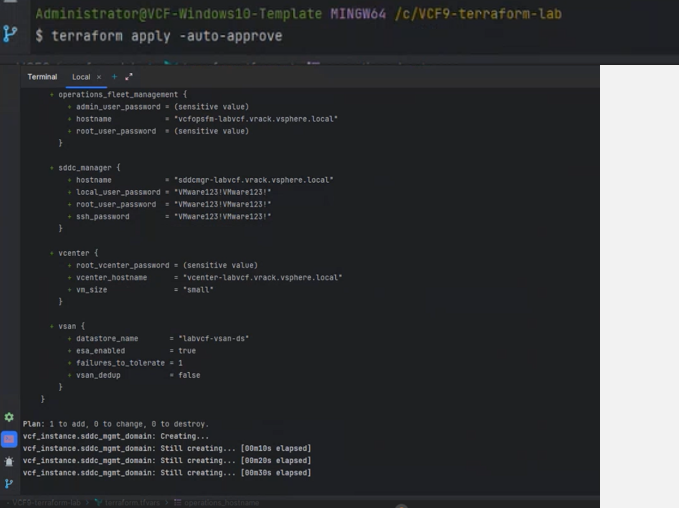
Once terraform apply has been triggered, we can go to VCF installer GUI and monitor the progress.
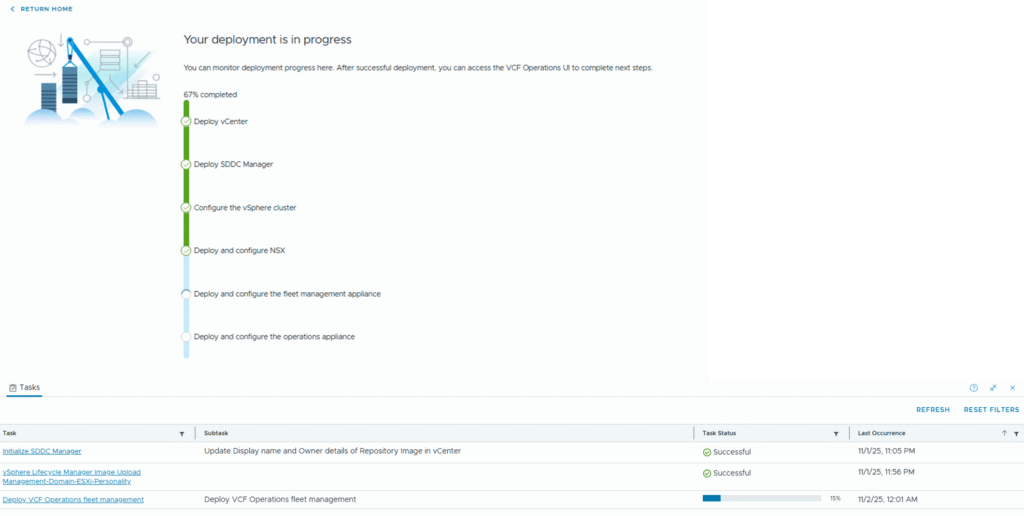
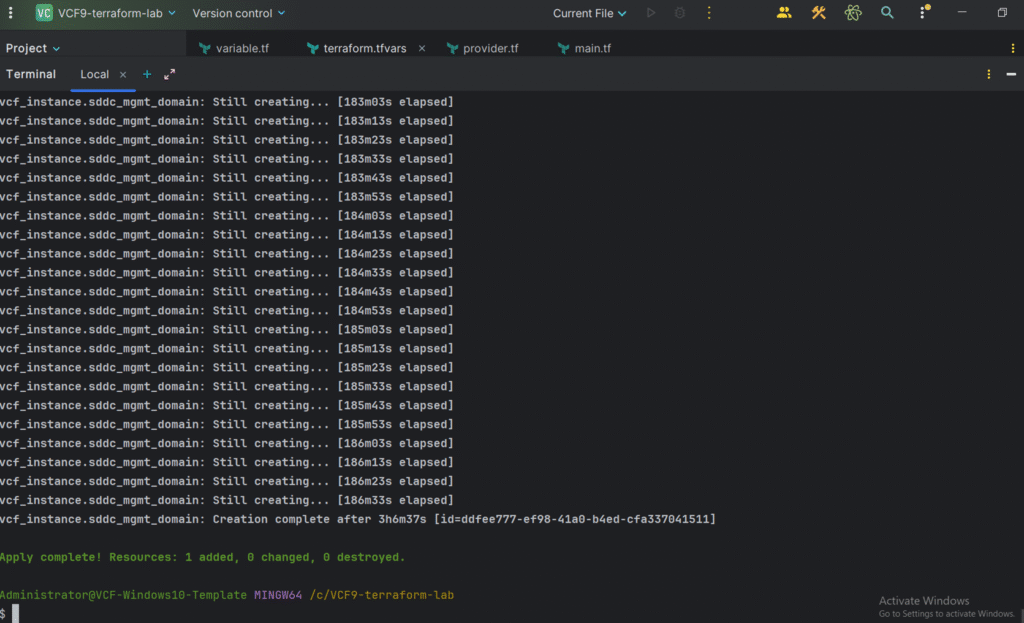
Like this we can do VCF Fleet deployment using terraform.
That’s it for today’s blog, thank you for reading.
Thats really helpful Raju.