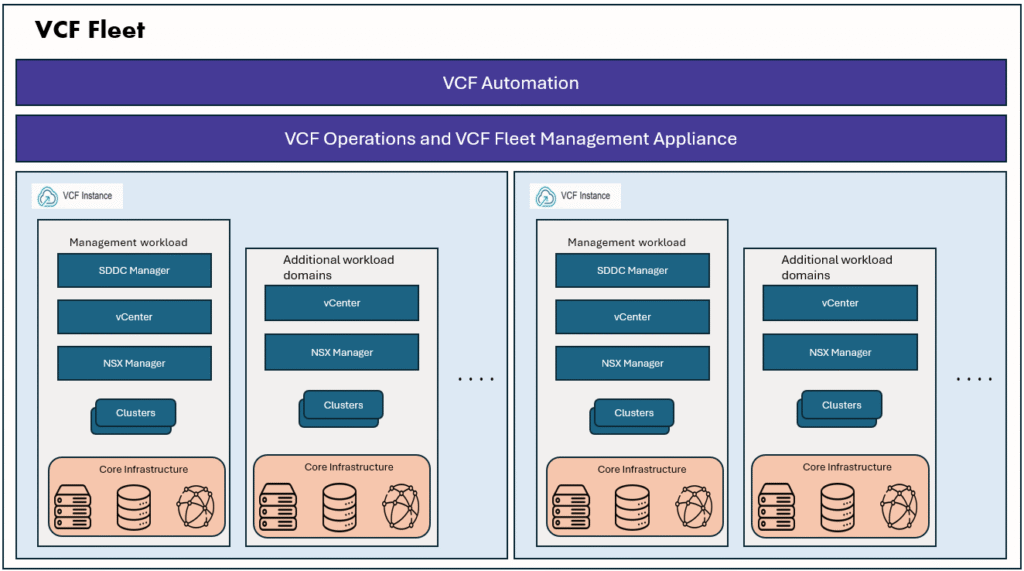
VMware Cloud Foundation (VCF) delivers a unified, software-defined platform that integrates compute, storage, networking, and management into a consistent cloud operating model. This abstraction and automation simplify cloud management and enable enterprises to run modern workloads with agility and efficiency.
In my previous blog, I walked through the VCF architecture and its core components. In this article, we will explore the key operational changes introduced in VCF 9, with an emphasis on how Day 0 (deployment/bring-up) and Day N (post deployment operations and lifecycle management) tasks are handled differently compared to previous versions.
By the end of this post, you’ll gain a clear understanding of how VCF 9 improves:
- The initial deployment model (Day 0) with the introduction of the new VCF Installer appliance.
- The operational management model (Day N) through the consolidation of tools and the new VCF Operations layer.
VCF Installer
In earlier versions of VMware Cloud Foundation (prior to VCF 9.0), the deployment process for the management domain handled by the Cloud Builder appliance. Cloud Builder orchestrated the initial bring-up of the management domain.
With the release of VCF 9.0, VMware introduced a new appliance called VCF Installer appliance. Unlike the heavier Cloud Builder, the VCF Installer is a lightweight deployment engine specifically designed to initialize and provision a new VCF fleet
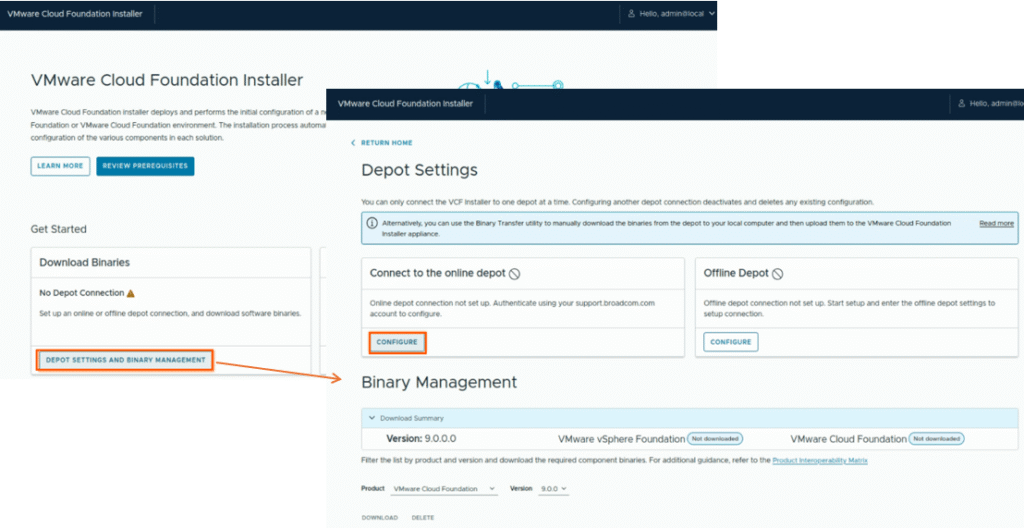
Key differences include:
Cloud Builder (Pre-VCF 9.x):
- Dedicated to deploying the management domain.
- Required significant resources and handled complex workflows to bring up core VCF services.
VCF Installer (VCF 9.x and later):
- Simplified, lightweight appliance with reduced footprint.
- In Built depot management, supports both online and offline depot configuration.
- Orchestrates the creation of a VCF fleet from scratch.
- Can be used for deploying VVF – VMware vSphere Foundation as well.
We will explore more about VCF installer and deploy a VCF Fleet in another blog.
Day 2 Operations in VCF9
One of the most significant changes in VMware Cloud Foundation 9 is the way Day 2 operations are performed. In earlier versions of VCF, administrators relied heavily on SDDC Manager for post-deployment tasks such as host commissioning, new workload domain creation, node add, cluster add, certificate rotation, password management, and lifecycle management. With VCF 9, these functions have been consolidated into the new VCF Operations layer, providing a unified and streamlined operational model.
The following activities are now centrally managed through VCF Operations:
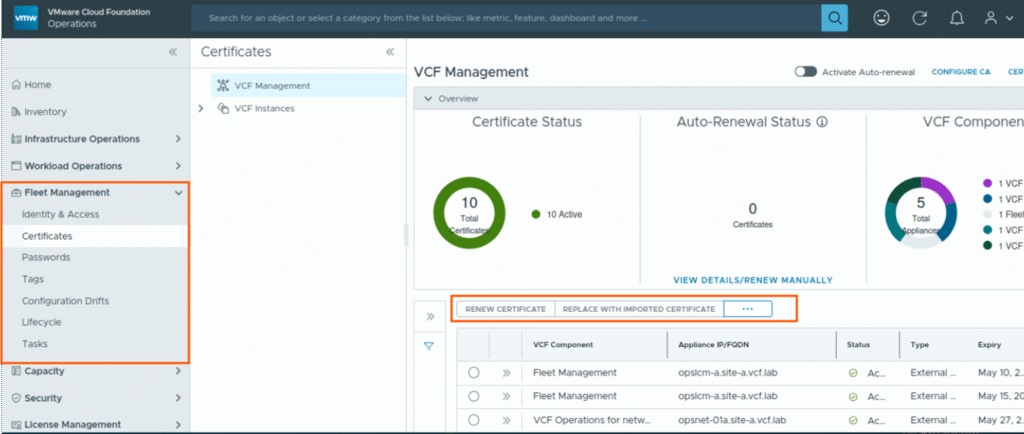
- Certificate Management – Automated provisioning, renewal, and replacement of platform certificates.
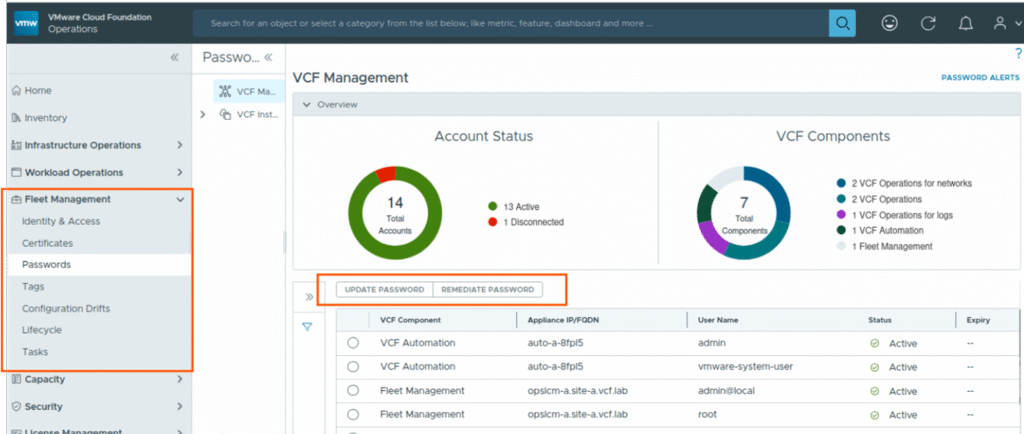
- Password Management – Secure, centralized handling of infrastructure account credentials, with simplified rotation workflows.
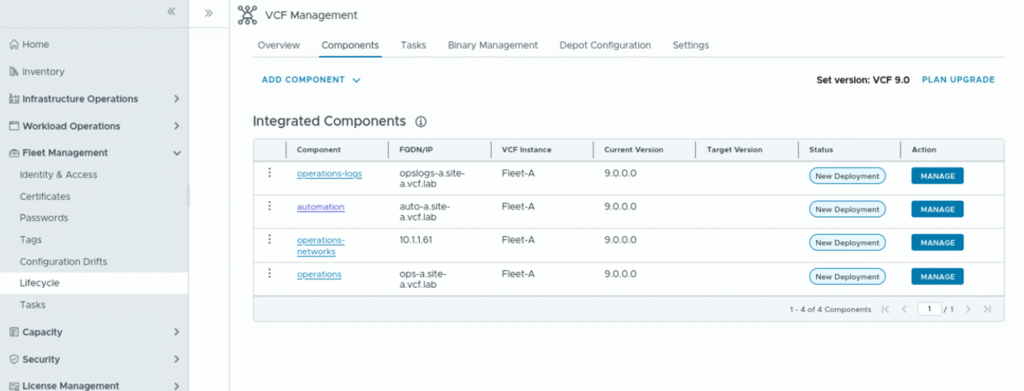
- Lifecycle Management (LCM) – End-to-end patching and upgrades for VCF instances, workload domains, and underlying infrastructure components.
- VCF Single Sign-On (SSO) – Unified authentication and access control across the fleet.
- Host Commissioning – Onboarding of new ESXi hosts into the VCF environment with validation and compliance checks.
- Cluster Operations – Adding or expanding clusters within workload domains in a controlled, automated manner.
Below, I’ve highlighted the most common tasks and demonstrated how they can be performed in the VCF Operations UI, accompanied by screenshots.
VCF Operations console UI
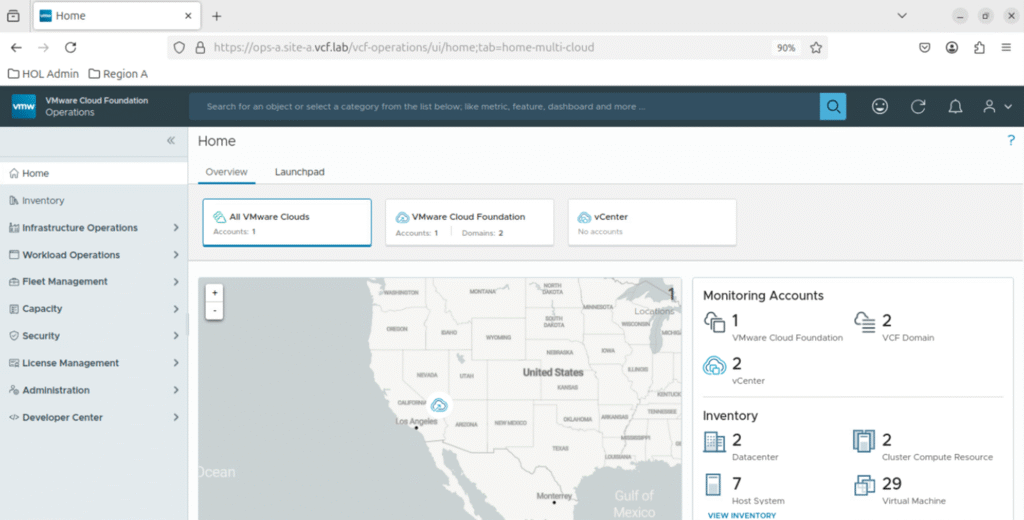
Network settings – DNS, NTP and Backup settings
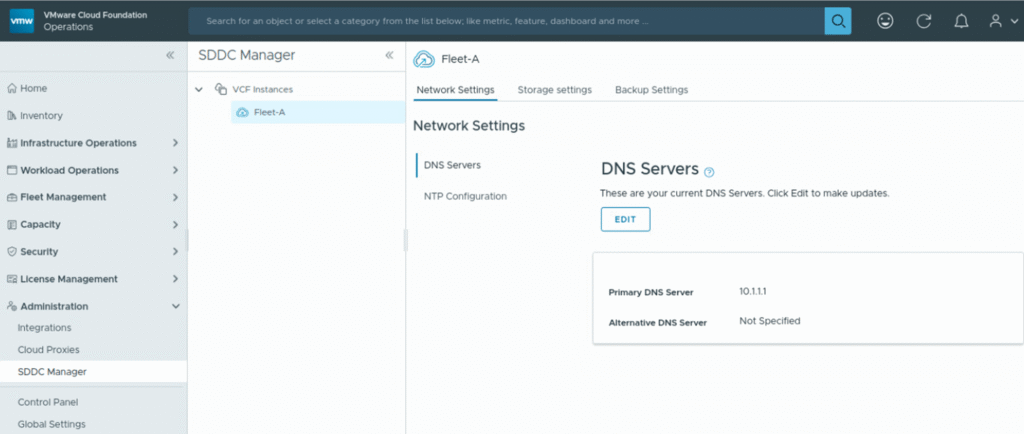
VCF Certificate management for all VCF components
VCF Password Management
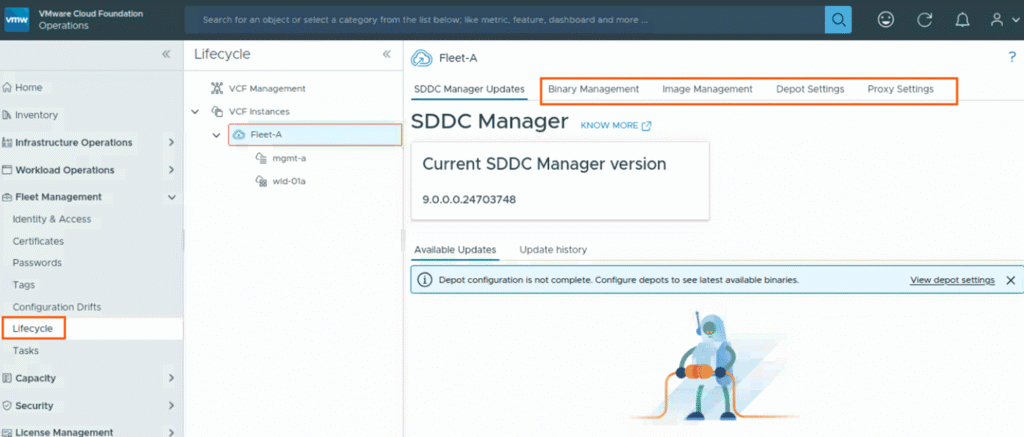
Lifecycle Management (LCM) for VCF Management components (VCF Ops and Automation)
Lifecycle Management for VCF core components
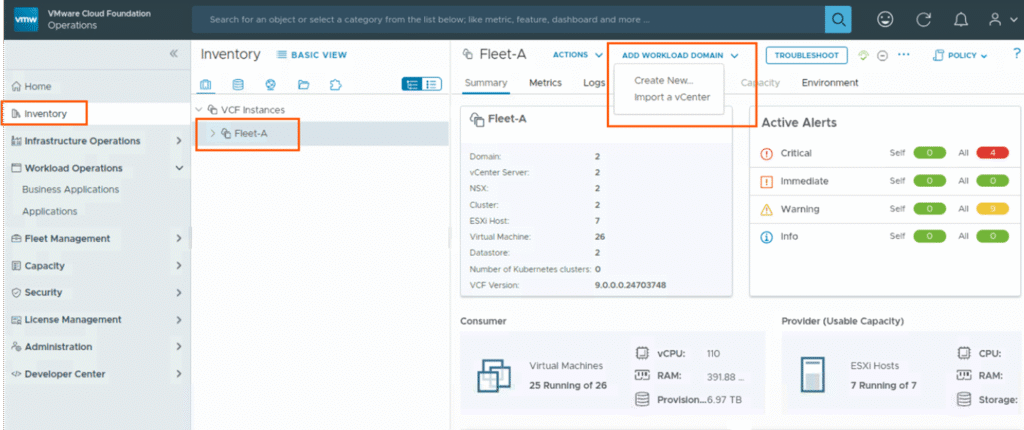
Create a New workload domain or import existing vCenter as new workload domain
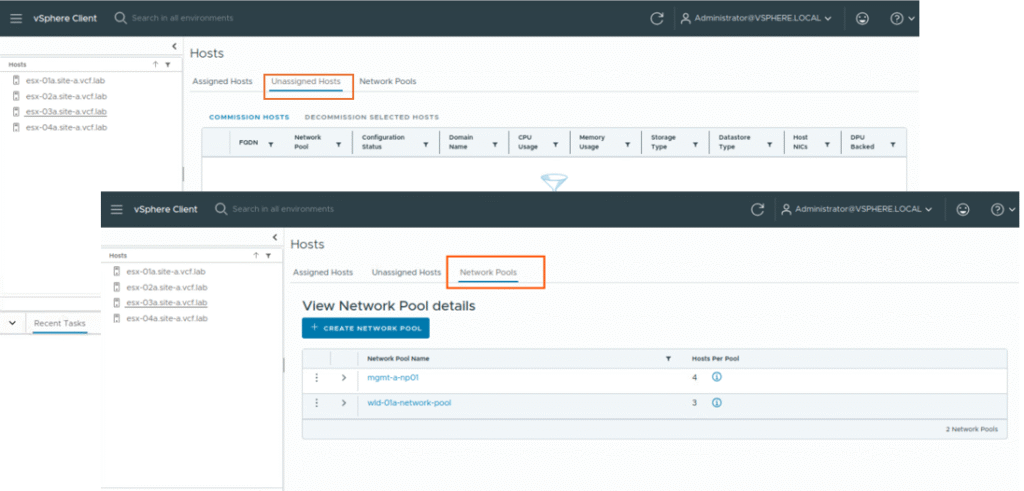
Commission hosts and Network pools
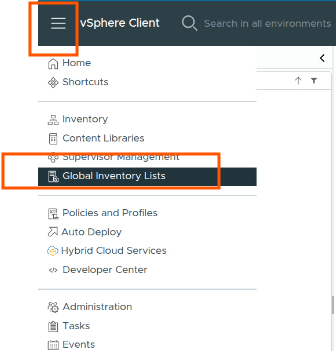
This option is now in vCenter client, Global inventory lists section.
Note: This commission hosts functionality is only available from management vcenter only, even you are commissioning hosts for VI workload domain clusters, you have to commission hosts from management vCenter only.
Here in vCenter, you can navigate to global inventory lists section to see Assigned hosts, Unassigned hosts, and Network pools. You can click on commission hosts button to commission new hosts.
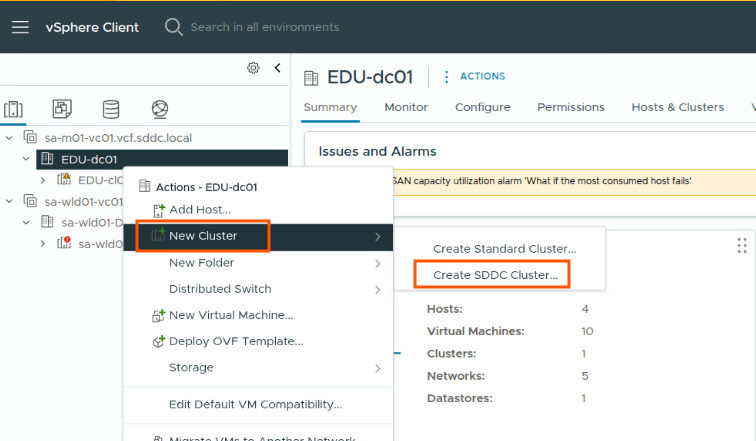
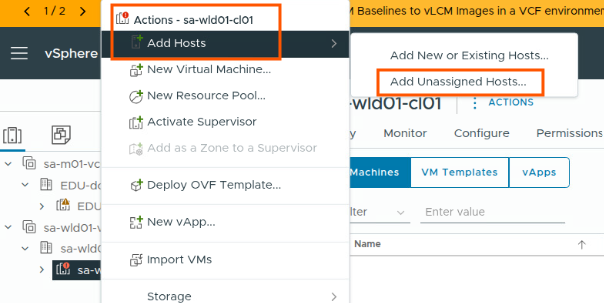
Add a new cluster to workload domain, Add new host to a cluster in workload domain
These operations should be done from vCenter client side
As of today, you can do this from sddc manager GUI as well but SDDC Manager GUI is going to be deprecated in future releases.
Key Takeaways
- VCF Installer replaces Cloud Builder → Initial deployment (Day 0) is now handled by a lightweight VCF Installer appliance.
- Shift to fleet-based architecture → VCF 9 introduces the concept of a VCF fleet/instance, aligning deployment and operations around a more modular model.
- Centralized Day 2 operations → Tasks such as certificate management, password rotation, lifecycle management, SSO, host commissioning, and cluster expansion are consolidated under VCF Operations and vSphere client.
- SDDC Manager UI deprecation → The traditional SDDC Manager UI is being phased out, with its capabilities now accessible through the VCF Operations console.
Happy Reading !